Clever Ops

Prompt Composer

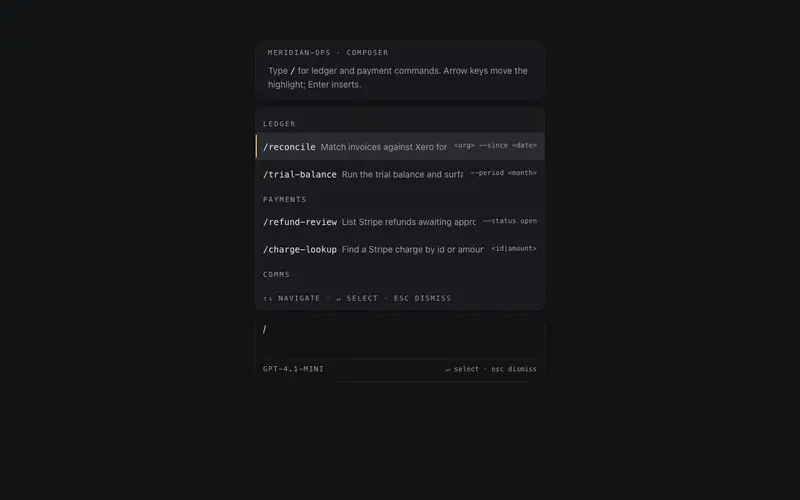
The agent input surface done right, auto-growing textarea, attachment chips, a slash-command hint row, and a model-plus-cost strip on the bottom seam; fully controlled, submits on cmd-enter.

Preview & code

Loading Prompt Composer preview

Installation

pnpm dlx shadcn@latest add @cleverui/prompt-composer

Requires the @cleverui registry in your components.json, a one-off, two-line setup.

Usage

tsx
import { PromptComposer } from '@/components/ui/prompt-composer'
Exampletsx
'use client'

import { useCallback, useEffect, useRef, useState } from 'react'
import { useReducedMotion } from 'motion/react'
import {
  PromptComposer,
  type PromptAttachment,
} from '@/components/ui/prompt-composer'

const COMMANDS = [
  {
    name: 'reconcile',
    hint: 'Match invoices against Xero for a period',
  },
  {
    name: 'digest',
    hint: 'Draft the weekly ops digest for #ops',
  },
  {
    name: 'refund-review',
    hint: 'List Stripe refunds awaiting approval',
  },
  {
    name: 'escalate',
    hint: 'Surface stalled Linear tickets',
  },
]

const INITIAL_ATTACHMENTS: PromptAttachment[] = [
  { id: 'a1', name: 'invoices-q2.csv', size: '48 KB' },
  { id: 'a2', name: 'xero-export-may.xlsx', size: '212 KB' },
  { id: 'a3', name: 'payout-notes.md', size: '6 KB' },
]

export default function PromptComposerDemo() {
  const reduced = useReducedMotion()
  const [value, setValue] = useState(
    'Reconcile May invoices for Apex Holdings and flag mismatches over $50.'
  )
  const [attachments, setAttachments] =
    useState<PromptAttachment[]>(INITIAL_ATTACHMENTS)
  const [streaming, setStreaming] = useState(false)
  const [note, setNote] = useState<string | null>(null)
  const streamTimer = useRef<ReturnType<typeof setTimeout> | null>(null)

  useEffect(() => {
    return () => {
      if (streamTimer.current) clearTimeout(streamTimer.current)
    }
  }, [])

  const onSubmit = useCallback(
    (text: string) => {
      setNote(`submitted: ${text.slice(0, 56)}${text.length > 56 ? '…' : ''}`)
      setStreaming(true)
      setValue('')
      if (streamTimer.current) clearTimeout(streamTimer.current)
      // deterministic settle, not tied to wall-clock in render
      streamTimer.current = setTimeout(
        () => {
          setStreaming(false)
          setNote('response complete')
          streamTimer.current = null
        },
        reduced ? 400 : 2200
      )
    },
    [reduced]
  )

  const onStop = useCallback(() => {
    if (streamTimer.current) {
      clearTimeout(streamTimer.current)
      streamTimer.current = null
    }
    setStreaming(false)
    setNote('stopped')
  }, [])

  const onCommandSelect = useCallback((name: string) => {
    setValue(`/${name} `)
  }, [])

  return (
    <div className="mx-auto flex min-h-[480px] w-full max-w-2xl flex-col justify-end gap-4 px-4 py-12 sm:px-6 sm:py-16">
      <div className="rounded-2xl border border-border/60 bg-background px-4 py-3 sm:px-5">
        <p className="font-mono text-[11px] uppercase tracking-[0.16em] text-muted-foreground">
          meridian-ops · composer
        </p>
        <p className="mt-2 text-sm leading-relaxed text-muted-foreground">
          Type <span className="font-mono text-foreground">/</span> for
          slash commands, or send with ⌘↵. Attachments ride above the draft.
        </p>
      </div>

      <PromptComposer
        value={value}
        onChange={setValue}
        onSubmit={onSubmit}
        attachments={attachments}
        onRemoveAttachment={(id) =>
          setAttachments((prev) => prev.filter((a) => a.id !== id))
        }
        onAttach={() =>
          setNote('File picker opened by parent (stub)')
        }
        commands={COMMANDS}
        onCommandSelect={onCommandSelect}
        model="claude-sonnet-4-5"
        cost="~$0.014/msg"
        streaming={streaming}
        onStop={onStop}
        placeholder="Message meridian-ops…"
      />

      {note && (
        <p className="text-center font-mono text-[11px] text-muted-foreground sm:text-xs">
          {note}
        </p>
      )}
    </div>
  )
}

API reference

PromptComposer accepts the following props.

PropTypeDefaultDescription
value*stringdraft text, fully controlled
onChange*(value: string) => voidfires per keystroke with the next value
onSubmit(value: string) => voidfires on send or cmd/ctrl-enter; never while streaming or empty
attachmentsPromptAttachment[]attached-file chips
onRemoveAttachment(id: string) => voidfires from a chip's remove button
onAttach() => voidpaperclip callback; omitted hides the button
commandsPromptCommand[]slash commands surfaced while value starts with '/'
onCommandSelect(name: string) => voidfires with the chosen command name
modelstringmono model id on the bottom seam
coststringmono estimated-cost string rendered verbatim
streamingbooleanfalsetrue while a response is in flight
onStop() => voidfires from the stop button while streaming
placeholderstring'Message meridian-ops…'
maxRowsnumber8auto-grow clamp; past it the textarea scrolls internally

…plus everything from Omit< React.HTMLAttributes<HTMLElement>, 'onChange' | 'onSubmit' | 'onDrag' | 'onDragStart' | 'onDragEnd' | 'onAnimationStart' >: className, event handlers, aria attributes and the rest pass straight through.

Referenced types

Typestsx
export interface PromptAttachment {
  id: string
  name: string
  size?: string
}

export interface PromptCommand {
  name: string
  hint: string
}

Frequently asked questions

How do I install the Prompt Composer component?

Register the @cleverui registry in your components.json ("@cleverui": "https://cleverops.com.au/r/{name}.json"), then run `npx shadcn@latest add @cleverui/prompt-composer`. The shadcn CLI copies the source into your project, you own the code from that point. You can also copy the source directly from this page.

What dependencies does Prompt Composer require?

Prompt Composer uses motion and lucide-react on top of React and Tailwind CSS. You don't need to install them manually, the shadcn CLI resolves and installs npm dependencies automatically when you add the component.

Can I theme Prompt Composer to match my brand?

Yes. The component is styled entirely with Tailwind utilities over standard design tokens (primary, background, muted, border), so it inherits your existing shadcn/ui theme automatically. Change your CSS variables and the component follows, no source edits needed for palette, radius, or fonts.

Want this built for you?

CleverUI is built by the Clever Ops web team. If you'd rather ship a hand-coded, fast, custom website than assemble one, we build them for Australian businesses every week.

Explore web development services