Clever Ops

Fine Dining Restaurant Template

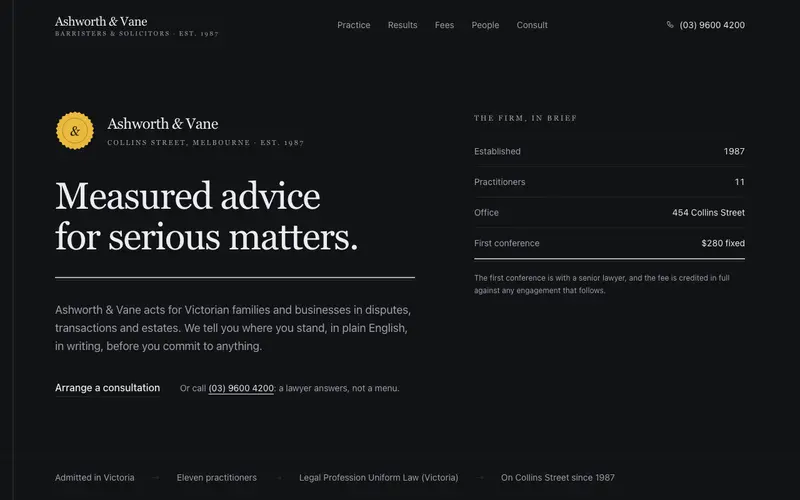
A complete restaurant site set like a printed menu, double-rule cover, dot-leader course tabs, cellar disclosures, provenance ledger and a working reservation sheet.

Preview & code

Loading Fine Dining Restaurant Template preview

Installation

pnpm dlx shadcn@latest add @cleverui/template-restaurant

Requires the @cleverui registry in your components.json, a one-off, two-line setup.

Usage

tsx
import { TemplateRestaurant } from '@/components/blocks/template-restaurant'
Exampletsx
import { TemplateRestaurant } from '@/components/blocks/template-restaurant'

export default function TemplateRestaurantDemo() {
  return <TemplateRestaurant />
}

API reference

TemplateRestaurant accepts the following props.

PropTypeDefaultDescription
contentBanksiaContentdefaultContentoverride any word, dish or hour, spread `defaultContent` and change what you need
classNamestring

Referenced types

Typestsx
export interface BanksiaContent {
  brand: {
    /** the wordmark, one word works best */
    name: string
    region: string
    established: string
  }
  nav: {
    links: BanksiaLink[]
    cta: BanksiaLink
    phone: BanksiaLink
  }
  /** the menu cover: double-rule frame, wordmark, one italic line */
  hero: {
    kicker: string
    lede: string
    season: string
    primaryCta: BanksiaLink
    secondaryCta: BanksiaLink
    /** mono hours line at the foot of the cover */
    hoursLine: string
  }
  /** the fact strip under the cover: seats, seatings, when the fire is lit */
  trust: {
    label: string
    facts: BanksiaFact[]
  }
  /** 01, the space and its plates */
  room: {
    number: string
    eyebrow: string
    heading: string
    lede: string
    panels: BanksiaRoomPanel[]
    note: string
  }
  /** 02, the winter menu as course tabs with dot leaders */
  menu: {
    number: string
    eyebrow: string
    heading: string
    intro: string
    tabsLabel: string
    courses: BanksiaCourse[]
    tasting: { heading: string; body: string; price: string; pairing: string }
    colophon: string
  }
  /** 03, the fire: red gum, frost, the growers */
  fire: {
    number: string
    eyebrow: string
    heading: string
    lede: string
    paragraphs: string[]
    stat: BanksiaFact
    growersHeading: string
    groups: BanksiaGrowerGroup[]
    note: string
  }
  /** 04, the cellar: a short wine list in disclosures */
  cellar: {
    number: string
    eyebrow: string
    heading: string
    lede: string
    groups: BanksiaWineGroup[]
    note: string
  }
  /** 05, evenings: the long room and gift vouchers */
  evenings: {
    number: string
    eyebrow: string
    heading: string
    lede: string
    longRoom: {
      heading: string
      body: string
      facts: BanksiaFact[]
      contactLabel: string
      contact: BanksiaLink
    }
    vouchers: { heading: string; line: string; price: string; cta: BanksiaLink }
  }
  /** 06, reserve: party size, a date note, the phone, a working form */
  reserve: {
    number: string
    eyebrow: string
    heading: string
    lede: string
    dateNote: string
    phone: { label: string; display: string; href: string }
    walkInNote: string
    partyLabel: string
    partySizes: string[]
    form: {
      nameLabel: string
      namePlaceholder: string
      phoneLabel: string
      phonePlaceholder: string
      eveningLabel: string
      eveningPlaceholder: string
      buttonLabel: string
    }
    confirmation: { stamp: string; line: string }
  }
  footer: {
    blurb: string
    visitHeading: string
    addressLines: string[]
    phone: string
    email: string
    hoursHeading: string
    /** short mono schedule lines */
    hoursSummary: string[]
    exploreHeading: string
    links: BanksiaLink[]
    acknowledgement: string
    copyright: string
    abn: string
    liquor: string
  }
  /** fixed bottom bar on small screens, reserve and call */
  actionBar: { reserveLabel: string; callLabel: string }
}

export interface BanksiaLink {
  label: string
  href: string
}

export interface BanksiaFact {
  label: string
  /** preformatted data, rendered in mono, e.g. "30" or "5:00 AM" */
  value: string
}

export interface BanksiaRoomPanel {
  caption: string
  drawing: 'hearth' | 'table' | 'light' | 'cellar'
  /** the featured panel spans the full row */
  featured?: boolean
}

export interface BanksiaCourse {
  /** stable id for tabs and panels, e.g. "snacks" */
  id: string
  label: string
  /** one italic line under the course name */
  note: string
  dishes: BanksiaDish[]
}

export interface BanksiaGrowerGroup {
  category: string
  growers: BanksiaGrower[]
}

export interface BanksiaWineGroup {
  label: string
  note: string
  wines: BanksiaWine[]
}

export interface BanksiaDish {
  name: string
  /** one italic serif line of what the dish actually is */
  note: string
  /** preformatted, e.g. "46" or "9" */
  price: string
  /** dietary marks, e.g. ["V", "GF"] */
  marks?: string[]
}

export interface BanksiaGrower {
  name: string
  place: string
  /** preformatted, e.g. "9 km" */
  distance: string
  /** one italic line of what they bring the kitchen */
  supplies: string
}

export interface BanksiaWine {
  name: string
  /** maker, place, one phrase on how it drinks */
  detail: string
  /** preformatted, e.g. "16" */
  price: string
}

Frequently asked questions

How do I install the Fine Dining Restaurant Template component?

Register the @cleverui registry in your components.json ("@cleverui": "https://cleverops.com.au/r/{name}.json"), then run `npx shadcn@latest add @cleverui/template-restaurant`. The shadcn CLI copies the source into your project, you own the code from that point. You can also copy the source directly from this page.

What dependencies does Fine Dining Restaurant Template require?

Fine Dining Restaurant Template uses motion on top of React and Tailwind CSS. You don't need to install it manually, the shadcn CLI resolves and installs npm dependencies automatically when you add the component.

Can I theme Fine Dining Restaurant Template to match my brand?

Yes. The component is styled entirely with Tailwind utilities over standard design tokens (primary, background, muted, border), so it inherits your existing shadcn/ui theme automatically. Change your CSS variables and the component follows, no source edits needed for palette, radius, or fonts.

Want this built for you?

CleverUI is built by the Clever Ops web team. If you'd rather ship a hand-coded, fast, custom website than assemble one, we build them for Australian businesses every week.

Explore web development services