How to create a monday.com API token
A monday.com personal API token is a long, secret credential that lets a connected tool, script, or developer read your boards, items, and updates through the monday.com API instead of clicking around the interface by hand. People usually create one so a reporting dashboard, automation, or consultant can pull data out of monday.com programmatically. The important thing to understand is that a personal API token mirrors your own account permissions exactly: it can see and do whatever you can see and do in the monday.com interface, and nothing more. If you cannot open a particular workspace or board, neither can the token. The token is free to generate, takes a couple of minutes, and you can regenerate it at any time to immediately invalidate the old one. This guide walks through creating the token, where to copy it from, and how to revoke it when it is no longer needed.
Keep this credential safe
A monday.com personal API token is like a password. Anyone who has it can read and change everything your own account can in monday.com, so treat it with the same care. monday.com does not offer a read-only scope for personal tokens, so the safest way to limit what a token can touch is to generate it from a user account that can only see the boards the connected tool genuinely needs. Always share the token through a secure method such as a password-manager share link, never in plaintext email or chat, and regenerate it as soon as it is no longer needed so the old value stops working.
Watch the walkthrough
Access to grant
Personal API token (a V2 GraphQL API token). Its permissions mirror your own monday.com account access, so it can read every board, item, and column you can read in the interface.
Who you're granting access to
- The developer, consultant, or tool that will read your monday.com data through the API.
Before you start
- A monday.com account you can sign in to. Any user can generate their own personal token from the Developer Centre.
- To use the Administration path instead, you need to be an account admin.
- A clear idea of which boards the connected tool should read, since the token inherits your own access. Consider generating it from a user account that can only see the data the tool genuinely needs.
Step by step
- 1
Open the Developer Centre
Sign in to monday.com. Click your profile picture in the top right corner, then choose Developers from the menu. This opens the monday Developer Centre in a new tab.
- 2
Go to the API token tab and reveal your token
In the Developer Centre, select API token in the left-side menu. You will see your personal API token shown as a masked field. Click Show to reveal it, then click Copy to copy it to your clipboard. If you have never used the API before, or you want a fresh token, click Regenerate first.

Source: monday.com developer docs: Authentication - 3
Or use the Administration path (admins only)
If you are an account admin, you can instead click your profile picture, choose Administration, open Connections, then select Personal API token. Click Copy to copy the token. This is the same personal token shown in the Developer Centre.
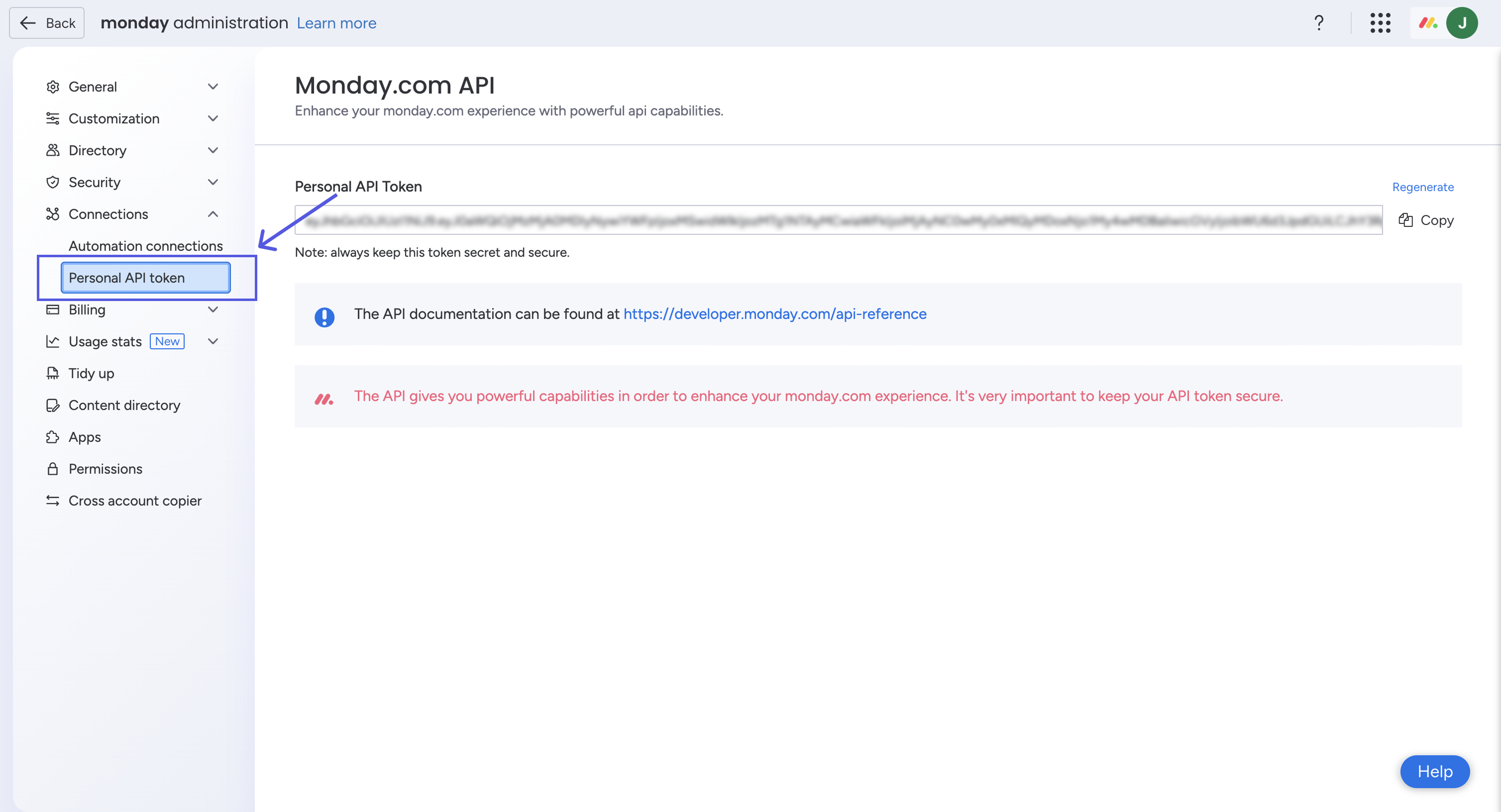
Source: monday.com developer docs: Authentication - 4
Share the token securely with the tool or developer
Hand the copied token to the developer or tool that needs it using a secure method, such as a password-manager share link, rather than plaintext email or chat. The connected tool puts the token in the Authorization header of its API requests. Once you have shared it, do not paste it anywhere it could be read by others.
Removing access afterwards
- Open the Developer Centre (profile picture, then Developers) and select API token, or as an admin go to profile picture, then Administration, then Connections, then Personal API token.
- Click Regenerate. This creates a new token and immediately invalidates the old one.
- Anything still using the old token will stop working straight away, so only do this once the engagement is over or you intend to issue the new token to the tool that should keep access.
If that option is not available
monday.com personal tokens always mirror your own account access and cannot be scoped to read-only, so if a tool needs tighter or audited access, consider a registered monday app that uses OAuth with specific permission scopes, or generate the token from a dedicated user account that can only see the relevant boards. If you would rather not hand over a token at all, you can share your screen on a short call and walk a consultant through the boards live. You should never need to share your monday.com password.
Frequently Asked Questions
No. A personal token mirrors your own account permissions exactly, so it can read and change anything you can in the interface. There is no read-only scope for personal tokens. To limit what it can touch, generate it from a user account that can only see the boards the connected tool needs.
Treat the token like a password. Anyone who has it can act as you in monday.com. Share it only through a secure method such as a password-manager share link, never in plaintext email or chat, and regenerate it as soon as it is no longer needed so the old value stops working.
Open the API token area in the Developer Centre, or Administration then Connections then Personal API token if you are an admin, and click Regenerate. This issues a new token and immediately invalidates the old one, so anything using the old token loses access right away.
No. Any monday.com user can generate their own personal token from the Developer Centre via the profile picture, then Developers, then API token. The Administration then Connections path is only available to account admins, but it shows the same personal token.
It can call the monday.com GraphQL API as if it were you, reading boards, items, columns, and updates that you can access. Because the token inherits your permissions, the cleanest way to control its reach is to control which boards the issuing account can see.
No. Generating and regenerating a personal API token is included in your monday.com plan at no extra cost. API usage is subject to monday.com rate and complexity limits, which depend on your plan tier.
Related guides
Steps last checked against monday.com on 2026-06-09.
Based on official monday.com documentation: monday.com developer docs: Authentication, monday.com developer docs: The Developer Centre, monday.com developer docs: Making your first request. monday.com is a trademark of its respective owner; this guide is independent and for instruction only.
Want this handled for you?
Clever Ops connects and automates the systems mid-market businesses already run. Book a free assessment and we will map your stack.